


How to Buy Variable Products: 3 Easy Steps
How to Buy a Variable Product: A Simple Guide
Buying a variable product on our store is easy! Variable products let you choose different options like size, color, or design variations before adding items to your cart. Here’s how to complete your purchase in three simple steps:
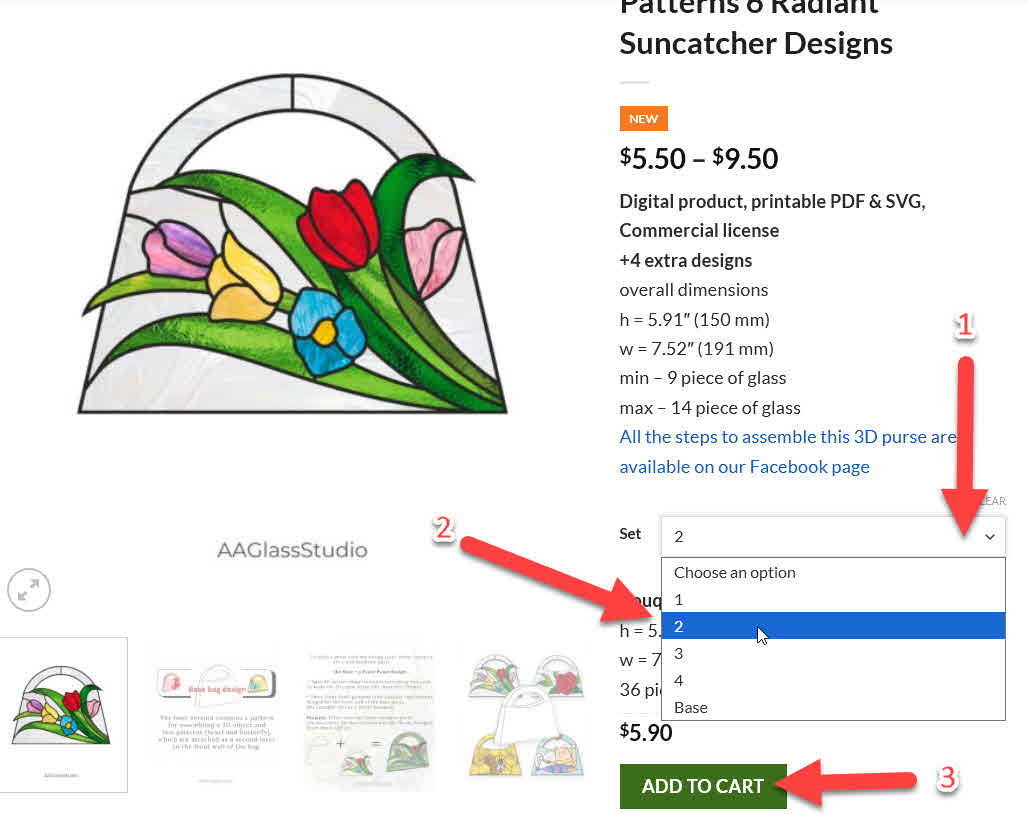
Step 1: Choose Your Set
Look for the dropdown menu labeled “Set” and click to see available options. In the example above, you can choose between options like “1”, “2”, “3”, “4”, or “Base” – each representing different product variations with their own specifications and prices.
Step 2: Select Your Variation
Once you click the dropdown, a list of available variations will appear with a blue highlight showing your selection. Each variation may have different dimensions, piece counts, or features. Take a moment to review the details displayed on the product page – like dimensions (h = 5.91″, w = 7.52″) and piece count (min 9, max 14 pieces of glass).
Step 3: Add to Cart
After selecting your preferred variation, click the green “ADD TO CART” button. The price will automatically update based on your selection, so you’ll always know exactly what you’re paying before checkout.
Quick Tips
That’s it! If you have any questions about product variations or need help with your order, feel free to contact us. Happy shopping!